One-click Prompt Scoring
Written By Christopher Lee
Last updated About 1 year ago
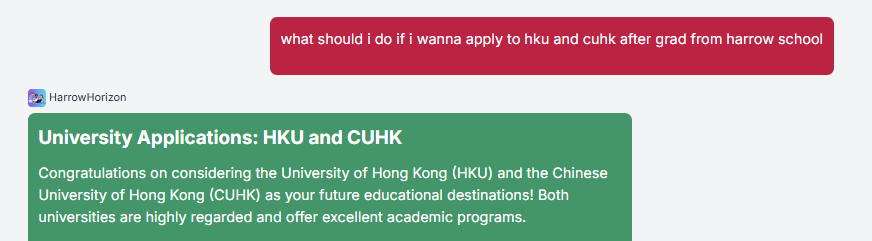
Knobase includes a built-in One-Click Prompt Scoring feature that helps users evaluate the quality of their AI prompts instantly. Whether you're a student learning how to ask better questions or a teacher guiding prompt-based assignments, this tool provides real-time feedback to improve clarity, specificity, and effectiveness.
🧠 Why Prompt Scoring Matters
✅ Helps students write clearer, more targeted prompts
✅ Improves the quality of AI responses by guiding better input
✅ Supports AI literacy and responsible usage
✅ Saves time by identifying weak prompts before submission
⚙️ How It Works
Type a Prompt in the Chat Interface
Example: “Write a caption for our school event.”
Click the “Score Prompt” Button
Located next to the input box or under the response area
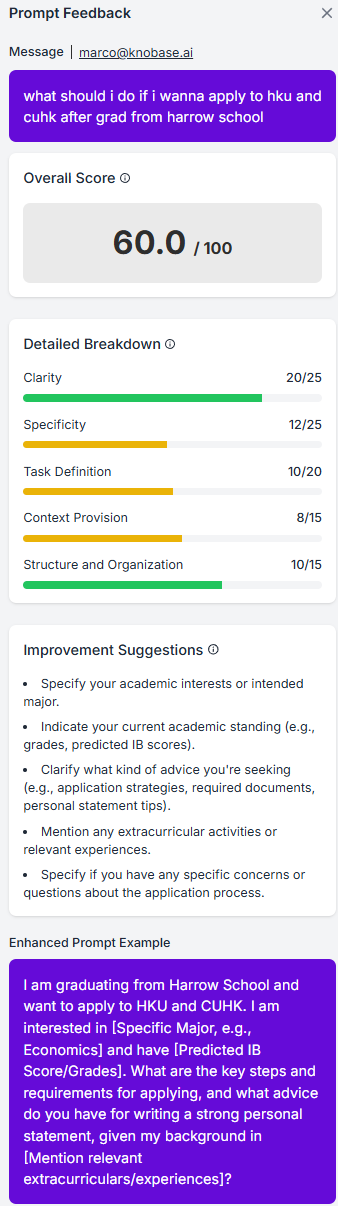
Receive Instant Feedback
The system evaluates the prompt based on:
Clarity: Is the context well-defined?
Specificity: Are key details included?
Structure: Is the prompt easy to interpret?
Tone & Audience Fit: Is it appropriate for the intended use?
View Suggestions
The agent provides tips to improve the prompt:
“Try specifying the event type and audience.”
“Include platform details like Instagram or newsletter.”
💡 Example: Weak vs. Strong Prompt
📊 Use Cases
🧑🎓 Students: Improve writing prompts for creative tasks, essays, or AI-assisted projects
🧑🏫 Teachers: Use scoring to teach prompt-writing in digital literacy or humanities classes
🧑💼 Admins: Evaluate queries for internal agents (e.g., policy lookup, scheduling)
Was this helpful?
Still need help? Ask the team