Simulate Real-World Queries
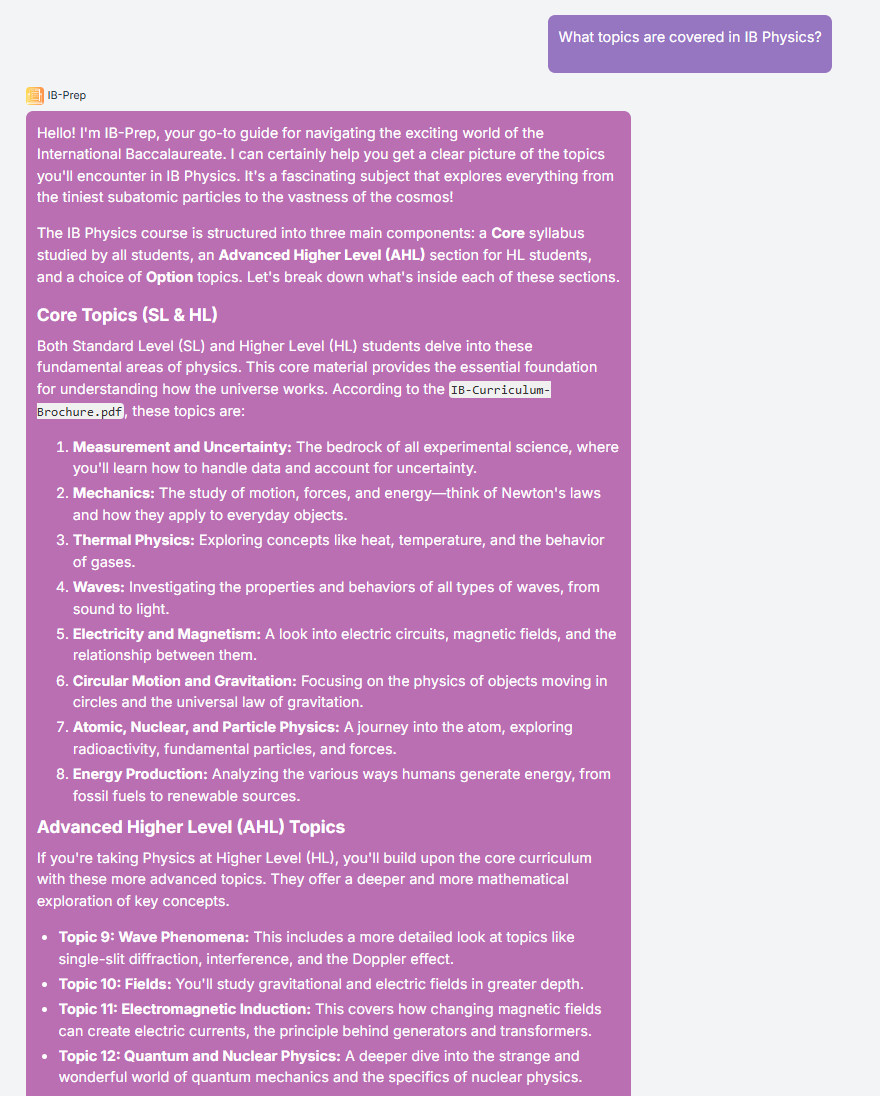
Once your agent is built and connected to your school’s documents, it’s time to simulate typical user interactions. This step helps you evaluate how well the agent performs in realistic scenarios—ensuring it delivers accurate, helpful, and context-aware responses.
Written By Christopher Lee
Last updated About 1 year ago
Why Simulation Is Important
✅ Verifies that the agent is using the correct documents.
✅ Ensures the tone matches the intended audience.
✅ Identifies gaps in knowledge or prompt clarity.
✅ Builds confidence before deployment.
Sample Questions to Try
Start with common queries that your audience might ask:
🧍♂️ Student: “What topics are covered in Term 2 Science?”
👨👩👧 Parent: “When is the next PTA meeting?”
🧑🏫 Staff: “What’s the school uniform policy?”
These questions test the agent’s ability to:
Retrieve specific information from curriculum guides, calendars, and policies.
Respond in a tone appropriate for students, parents, or staff.
Reference the correct documents or folders.
💡 Troubleshooting Tips
If the agent gives vague, incorrect, or generic answers, try the following:
Check Document Uploads
Ensure the relevant files (e.g., “Term 2 Science Curriculum.pdf”) are uploaded and connected to the agent.
Review the System Prompt
Make sure the prompt clearly defines the agent’s role, audience, and tone.
Add instructions like “Always cite the source document when relevant.”
Refine the Knowledge Base
Organize files into folders by subject or function.
Rename files for clarity and consistency.
Test Again
Re-run the same queries and compare responses.
Ask colleagues to test and provide feedback.
Was this helpful?
Still need help? Ask the team