Uploading School-Specific Materials
To ensure your Knobase agent provides accurate, personalized, and school-specific responses, you need to upload relevant documents. These files form the Knowledge Base that the agent uses to answer questions, give feedback, and support users with real context.
Written By Christopher Lee
Last updated About 1 year ago
Why It Matters
Agents trained on your school’s materials can respond with precision and relevance.
Reduces misinformation and generic answers.
Enables curriculum-aligned, policy-aware, and event-specific support.
What to Upload
Organize your files by subject or function to keep your Knowledge Base clean and efficient. Examples include:
📘 Curriculum Guides – Subject outlines, unit plans, learning outcomes
📅 Assessment Schedules – Test dates, grading criteria, rubrics
📜 School Policies – Attendance, uniform, academic honesty
🗓️ Event Calendars – Term dates, holidays, school events
📝 Homework Guidelines – Submission rules, formatting, expectations
🧑🏫 Staff Handbooks – Internal procedures, roles, responsibilities
How to Upload
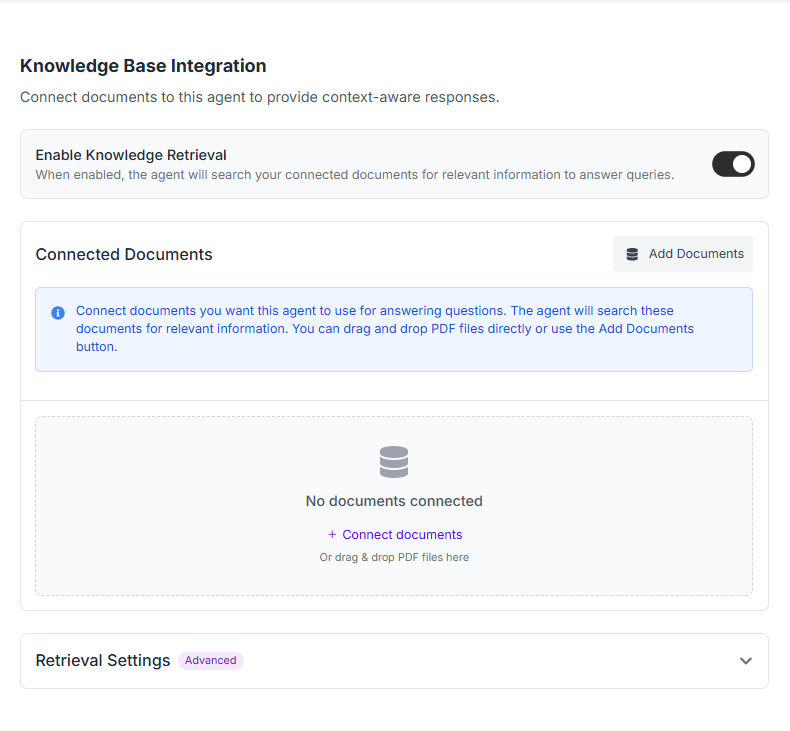
Knobase’s agent creation tool makes uploading simple and intuitive:
Click “Upload” in the agent setup interface.
Add files: Supported formats include PDF, Word (.docx), and plain text.
Organize your files:
Create folders like “Admin”, “Student Life”, “Curriculum”, etc.
Drag and drop files into the appropriate folders.
Connect the folder to your agent.
📌 Note: Maximum file size is 4MB per upload. Compress large files before uploading.
Tips for Effective Knowledge Upload
✅ Use clear file names (e.g., “Year 9 Science Curriculum.pdf”)
✅ Keep documents up to date
✅ Upload rubrics and examples for feedback agents
✅ Separate files by audience (e.g., staff vs. student-facing)

You can manually drag-select and upload more files as a folder (like Google Drive)to your agent in the Knowledge Base section. See the Knowledge Base article for more details.
Was this helpful?
Still need help? Ask the team