Advanced Agent Features
Knobase agents go far beyond simple question-and-answer interactions. With advanced capabilities, educators can design agents that support interactive, personalized, and multimodal learning experiences tailored to diverse classroom needs.
Written By Christopher Lee
Last updated About 1 year ago
Why It Matters
✅ Transforms agents into active learning companions, not just passive responders.
✅ Supports differentiated instruction and personalized feedback.
✅ Enables cross-disciplinary learning, creativity, and deeper engagement.

Advanced Features Overview
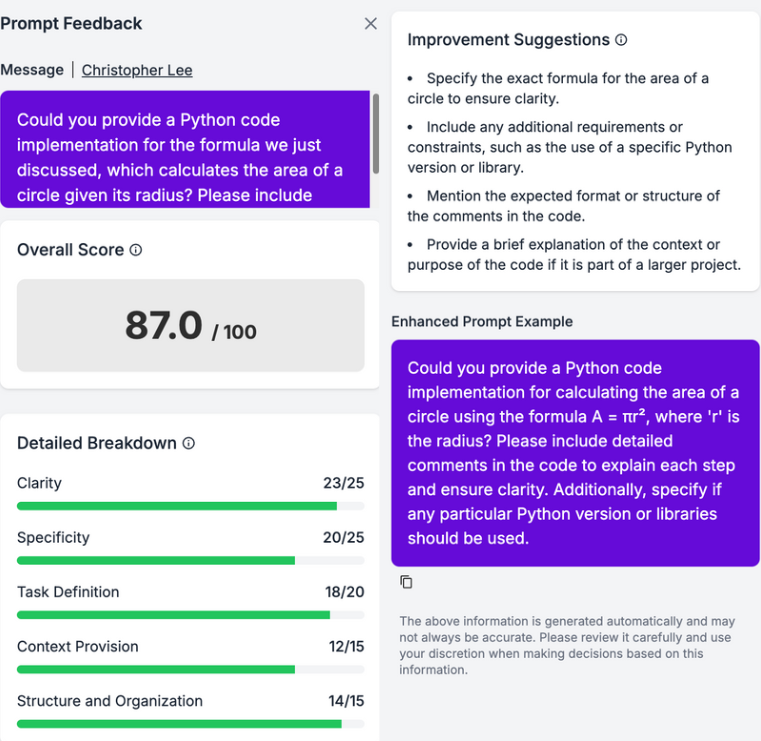
Prompt-Based Scoring & Feedback
Agents can evaluate student prompts or submissions and offer rubric-aligned feedback.
Useful for writing tasks, project drafts, and inquiry-based learning.
Multimodal Input Support
Students can submit text, images, PDFs, or even whiteboard drawings.
Agents respond with context-aware feedback based on visual or written content.
Real-Time Analytics
Teachers can view student interaction trends, common queries, and engagement levels.
Helps identify learning gaps and tailor instruction accordingly.
Customizable Tone & Style
Agents adapt their language, tone, and visual style based on age group or subject.
Supports inclusive and age-appropriate communication.
Role-Specific Behavior
Agents can be trained to behave like:
A Math Tutor that guides without giving direct answers.
A Curriculum Designer that knows your school’s syllabus.
A Lower Primary Assistant that explains in simple terms and friendly tone.
Safety & Escalation System
Prompts containing extreme or inappropriate content are automatically flagged.
Ensures responsible AI usage and protects student well-being.

Examples of Rich Interactions
🧑🎓 A student uploads a science diagram and asks, “Did I label this correctly?”
→ The agent checks against the curriculum and responds with targeted feedback.🧑🏫 A teacher asks, “Can you help me design a formative assessment for Year 7 History?”
→ The agent suggests question formats, learning outcomes, and rubric criteria.🧑💼 An admin staff member asks, “What’s our policy on leave applications?”
→ The agent retrieves the relevant section from the staff handbook.
Was this helpful?
Still need help? Ask the team