Text-to-Speech (TTS)
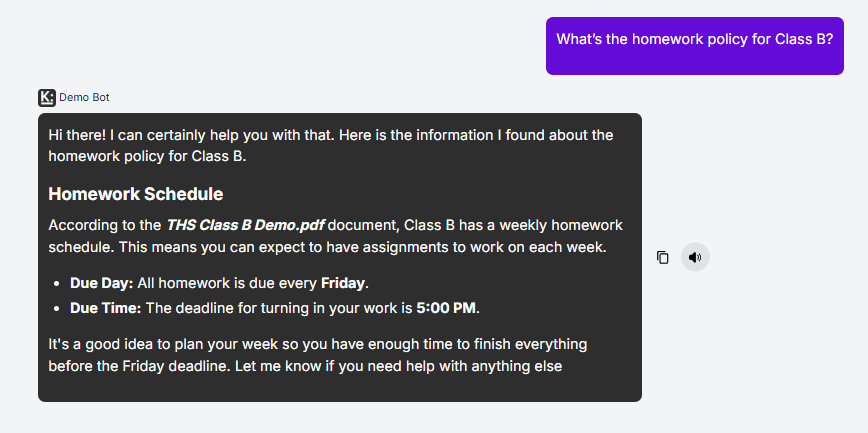
Knobase agents support Text-to-Speech (TTS), allowing users to hear responses read aloud. This feature enhances accessibility, supports auditory learners, and makes the platform more engaging—especially for younger students or users with reading challenges.
Written By Christopher Lee
Last updated About 1 year ago
🔊 How It Works
When chatting with an agent, users can press the speaker icon next to a response.
The agent’s reply will be read aloud using natural-sounding speech.
TTS is available across supported devices and browsers, with multilingual support.
🧠 Why TTS Matters
✅ Supports students with reading difficulties, visual impairments, or learning differences
✅ Enhances comprehension for auditory learners
✅ Makes agents more interactive and inclusive
✅ Useful in language learning and early education settings
💡 Use Case Examples
🧒 Primary Student: A Year 2 student asks, “What’s a triangle?”
→ The agent responds with a simple explanation and the student presses the speaker icon to hear it aloud.🧑🏫 Language Teacher: Uses TTS to help students practice pronunciation and listening skills.
🧑🎓 SEN Support Agent: Reads instructions aloud to students who benefit from auditory reinforcement.
🔧 Tips for Using TTS Effectively
✅ Encourage students to use TTS when they’re unsure about reading or pronunciation
✅ Pair TTS with visual aids for multimodal learning
✅ Use in quiet zones or with headphones to avoid classroom disruption