One-click Prompt Scoring

Written By Christopher Lee

Last updated 6 months ago

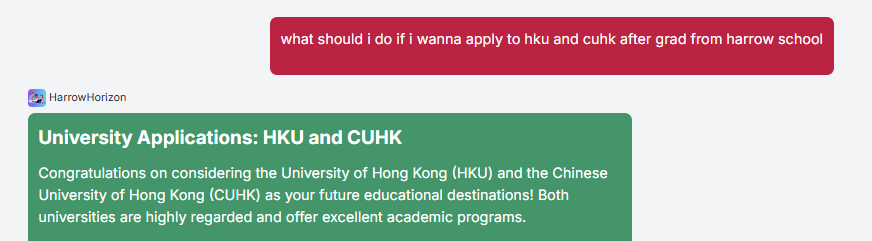
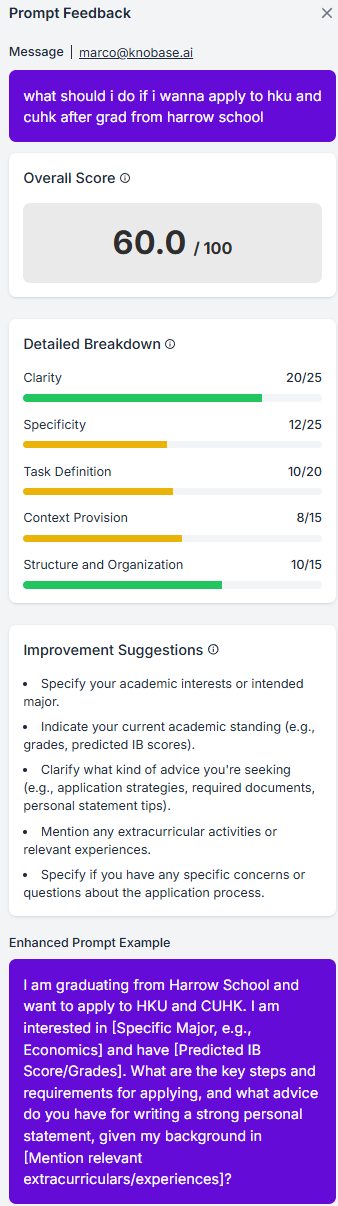
Knobase includes a built-in One-Click Prompt Scoring feature that helps users evaluate the quality of their AI prompts instantly. Whether you're a student learning how to ask better questions or a teacher guiding prompt-based assignments, this tool provides real-time feedback to improve clarity, specificity, and effectiveness.
🧠 Why Prompt Scoring Matters

  • ✅ Helps students write clearer, more targeted prompts

  • ✅ Improves the quality of AI responses by guiding better input

  • ✅ Supports AI literacy and responsible usage

  • ✅ Saves time by identifying weak prompts before submission


⚙️ How It Works

  1. Type a Prompt in the Chat Interface

    • Example: “Write a caption for our school event.”

  2. Click the “Score Prompt” Button

    • Located next to the input box or under the response area

  3. Receive Instant Feedback

    • The system evaluates the prompt based on:

      • Clarity: Is the context well-defined?

      • Specificity: Are key details included?

      • Structure: Is the prompt easy to interpret?

      • Tone & Audience Fit: Is it appropriate for the intended use?

  4. View Suggestions

    • The agent provides tips to improve the prompt:

      • “Try specifying the event type and audience.”

      • “Include platform details like Instagram or newsletter.”


💡 Example: Weak vs. Strong Prompt

Weak Prompt

Issue

Strong Prompt

Why It’s Better

“Write a summary.”

❌ No topic, audience, or length specified

“Summarize the key points of the Grade 10 biology lesson on photosynthesis in 150 words for a revision handout.”

✅ Clear subject, audience, and format

“Make a poster.”

❌ Missing theme, audience, and platform

“Design a poster for the school’s Earth Day event targeting primary students, to be printed and displayed in the hallway.”

✅ Specific event, audience, and use case

“Give feedback on my essay.”

❌ No rubric, subject, or focus area

“Evaluate my Grade 11 English essay on Macbeth using the school’s literary analysis rubric, focusing on thesis clarity and evidence.”

✅ Includes grade level, subject, rubric, and focus

“Create a quiz.”

❌ No topic, level, or format

“Create a 5-question multiple-choice quiz for Grade 6 students on the water cycle, with one diagram-based question.”

✅ Clear topic, format, and audience

“Help me with math.”

❌ Vague subject and problem type

“Explain how to solve a two-step algebraic equation for Year 8 students using a worked example.”

✅ Specific topic, level, and instructional style

“Write a story.”

❌ No genre, theme, or audience

“Write a short mystery story for Grade 7 students set in a school library, featuring a hidden clue and a twist ending.”

✅ Genre, setting, audience, and plot elements

“Translate this.”

❌ No language pair or context

“Translate this school announcement from English to Traditional Chinese for parents of primary students.”

✅ Language pair, context, and audience

📊 Use Cases

  • 🧑‍🎓 Students: Improve writing prompts for creative tasks, essays, or AI-assisted projects

  • 🧑‍🏫 Teachers: Use scoring to teach prompt-writing in digital literacy or humanities classes

  • 🧑‍💼 Admins: Evaluate queries for internal agents (e.g., policy lookup, scheduling)